NewPult 1.0 — free for macOS

Give your agents the console.
Keep the keys.

Pult owns every serial console on your Mac — routers, dev boards, SBCs — and records everything they print. Claude Code, Codex and other agents read freely and type under your rules. Anything risky waits for your yes.

FreemacOS 14 or laterApple silicon & IntelNo account

Connects in one click

Claude CodeCodexClaude DesktopCursorVS CodeGemini CLIWindsurfopencodeZedany MCP client
One broker for every UART

The serial console, rebuilt for
two kinds of users.

You, at the keyboard. And the agents you work with. Pult sits between them and every board on your bench, so neither ever fights the other — or the port.

Never stuck again

A daemon owns each port, so a hung screen can't hold it. Pult follows your adapter across replugs, frees ports other programs grabbed, and records every byte with its time.

Agents that know boards

Agents get the console as tools: read, search, wait for a prompt, run one command and get exactly its output. They learn each device's boot, prompts and flash layout from its history.

You stay in charge

Reading is free. Anything else asks you first, right in the menu bar. Commands that can brick a board are refused outright. Freeze every agent with one switch.

Agents work. You decide.

Every write goes through your rules.

An agent's command runs only when you aren't mid-line, and only if your rules say so.

  • Read-only commands run at once — dmesg, logread, cat /proc/mtd, printenv.
  • Everything else asks you in the app and the menu bar: Allow once, allow always, or no.
  • Board-bricking commands are refused in every context: mtd write, sysupgrade, saveenv, sf erase.
  • Passwords stay yours. At a login the agent asks; you type it straight into the device. It never sees it.
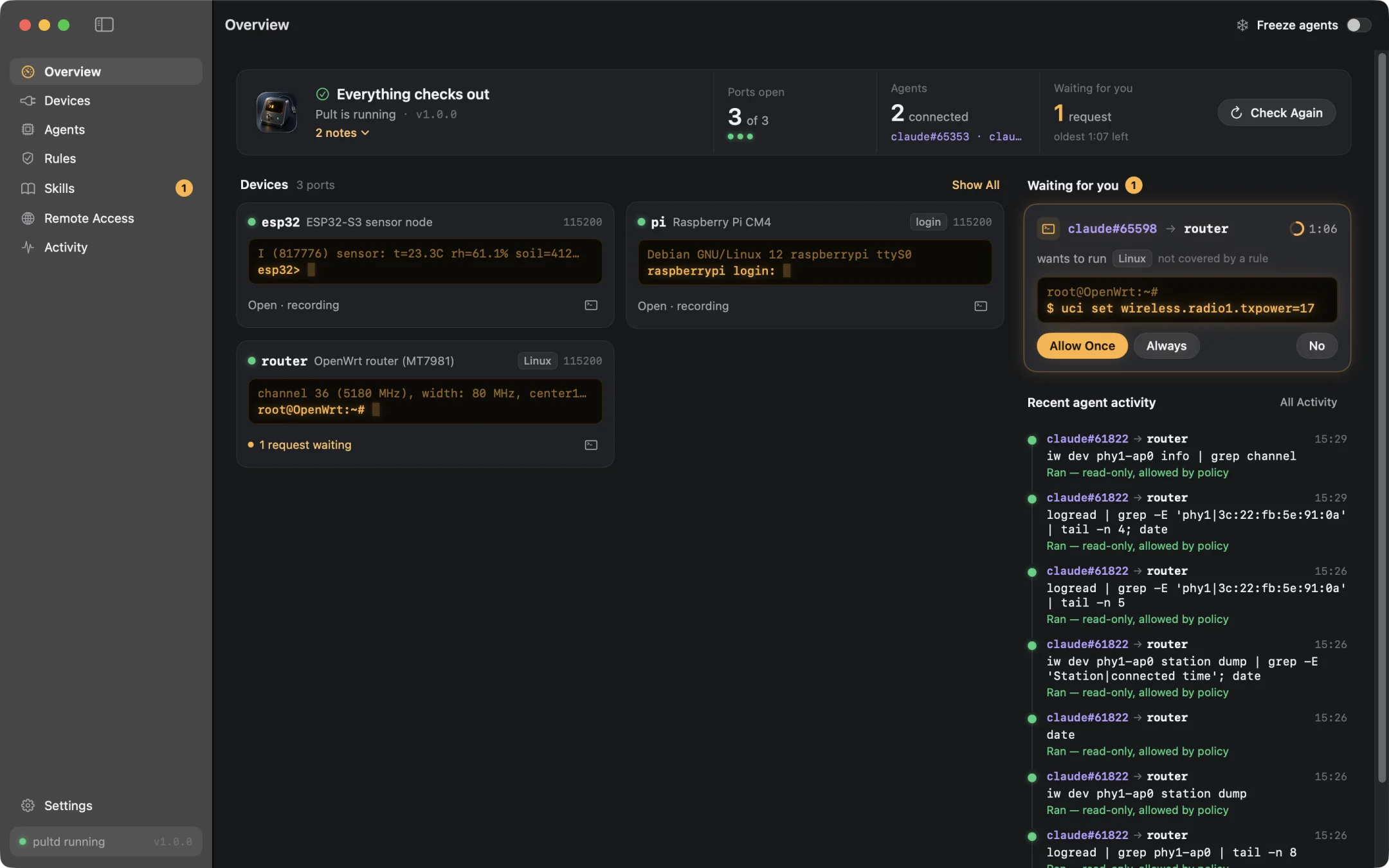
Pult's overview: three boards with their live consoles, and an agent's request waiting for Allow or No
The same request in Pult's menu bar panel
Rules you can test

Ask “what if?” before an agent does.

Type a command and see whether it would run, ask you, or be refused — right now, on that port, for that agent, and why.

  • Built-in protections for Linux and U-Boot, with every pattern visible.
  • Your own rules for all ports or just one: allow, ask, refuse.
  • Trust per agent: read-only, ask, or trusted on the ports you choose.
  • Nobody at the bench? Decide what agents may do while you're away.
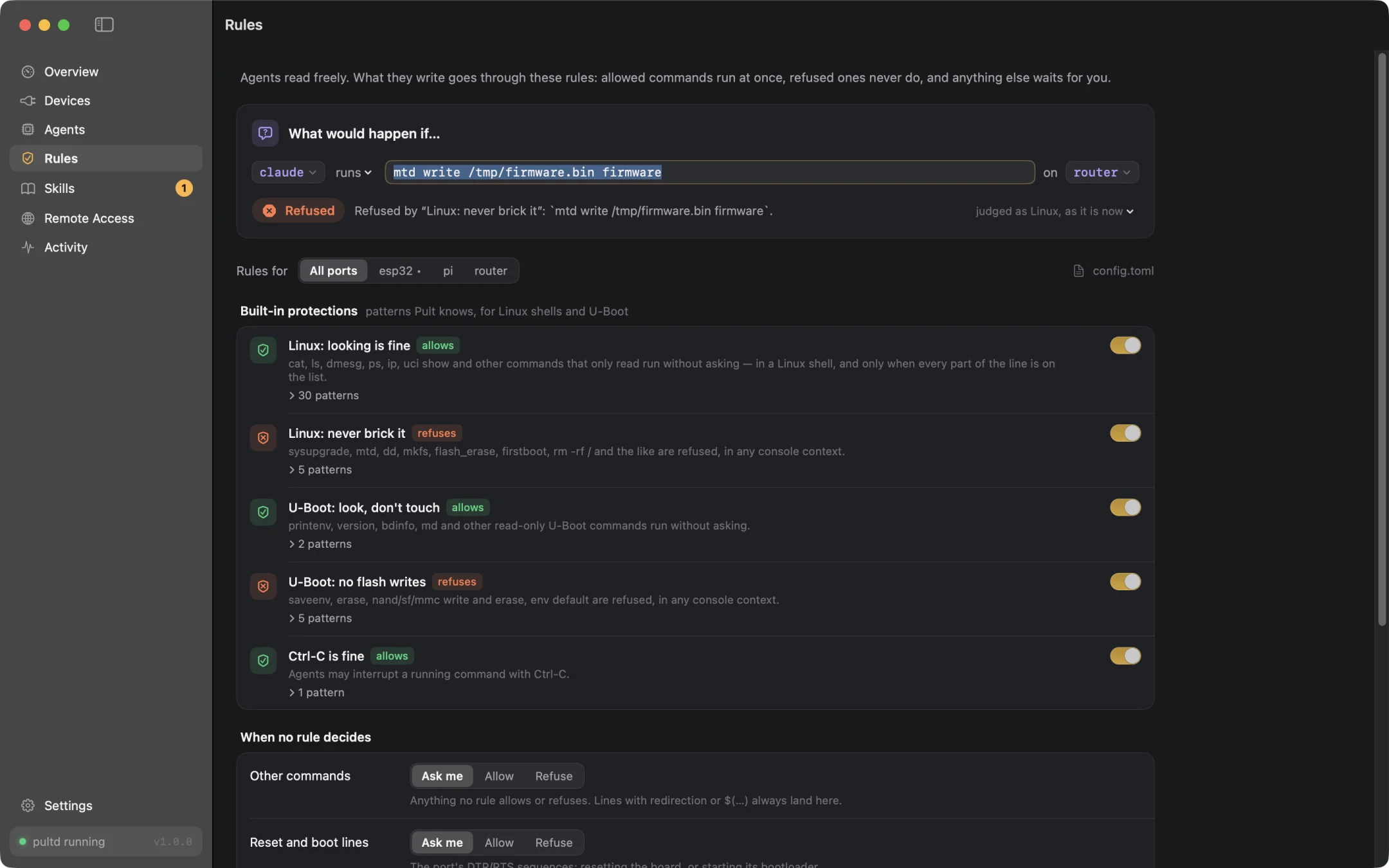
Pult's rules with the tester answering whether a command would run
Devices teach agents

Every board gets a skill.

Pult reads each console's history — bootloader, kernel, prompts, login, flash partitions, what ran and what was refused — and writes it up as a skill your agents load on their own.

  • Drafted from the console, kept up to date as firmware changes.
  • Your notes on top: how to recover it, what never to do.
  • Agents suggest notes; you review the diff and publish.
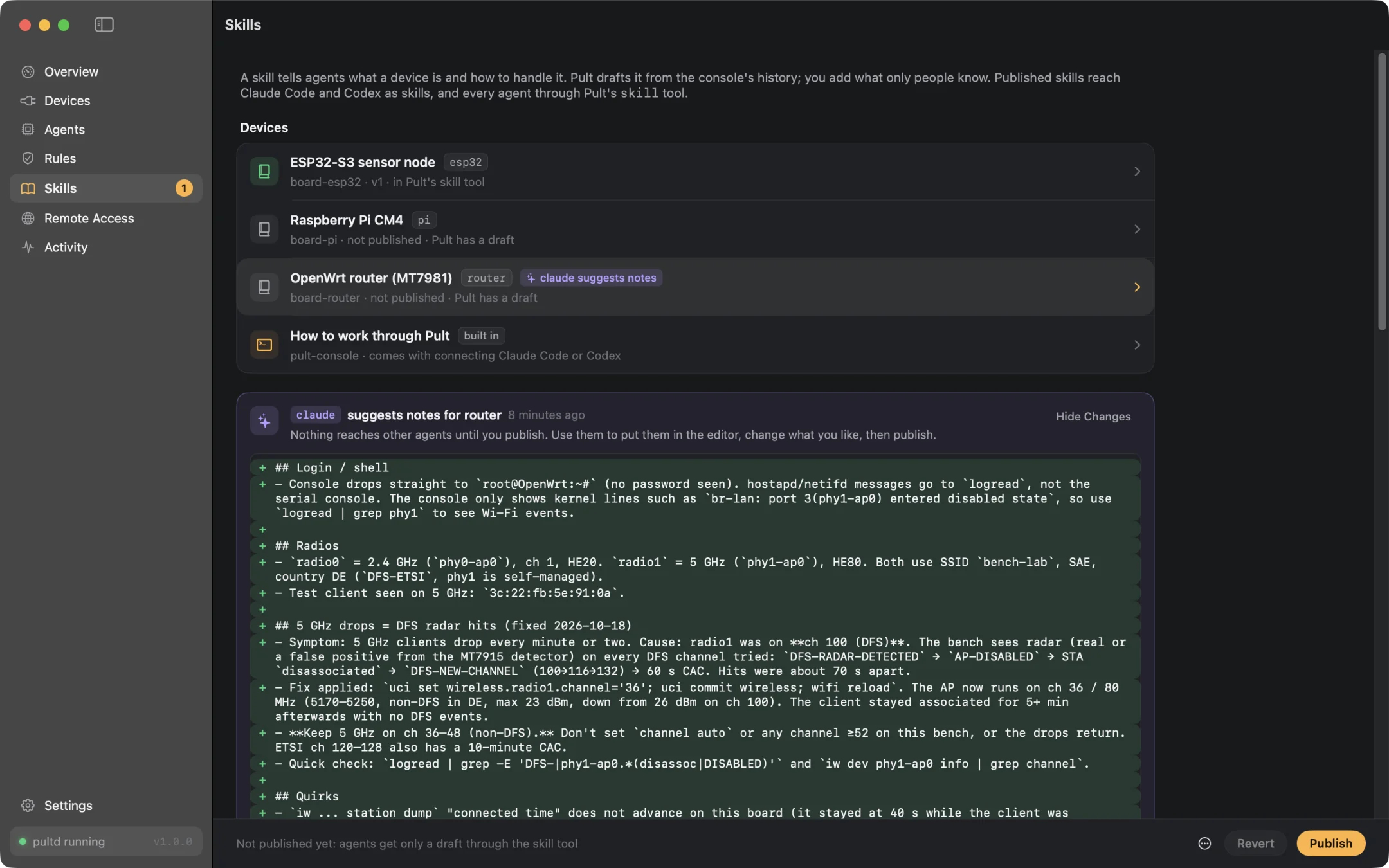
A device's skill in Pult: what Pult saw on the console, and the notes
Every byte, kept

Search everything your boards ever said.

Every console is recorded with receive times. Find the panic from Tuesday, with the lines around it — and see every agent action, every answer you gave, every port that came and went.

$ pult search router 'radar detected' --since start [router · 1 match in c:0–c:13894] c:8295 15:24:03.700 │ mt7915e 18000000.wifi: phy1: radar detected on 5580 MHz (channel 116) $ pult exec router 'iwinfo phy1-ap0 info' [router · done · 86 ms] phy1-ap0 ESSID: "bench-lab" Mode: Master Channel: 36 (5.180 GHz) HT Mode: HE80
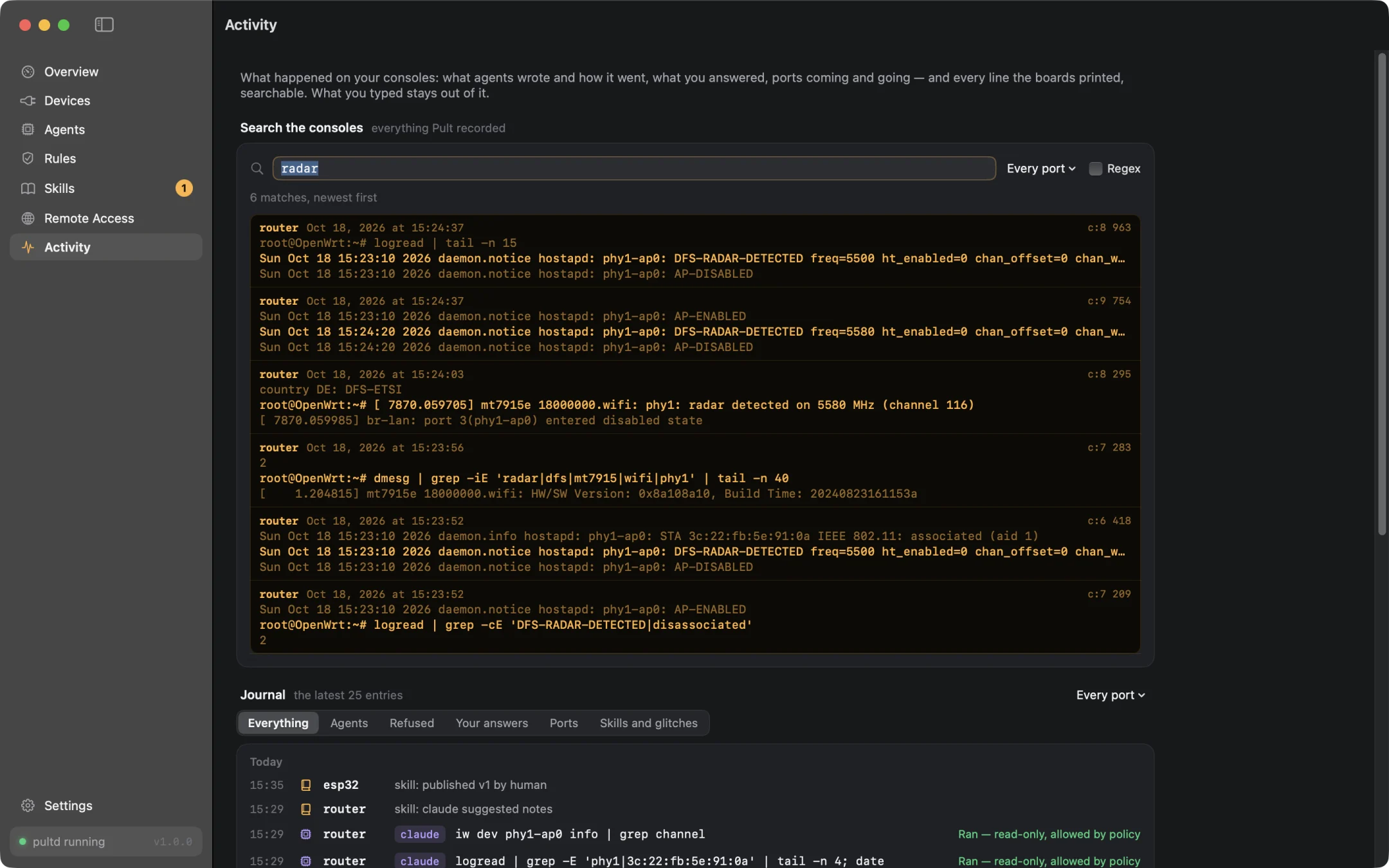
Pult's activity: the journal of every port and a search across all recordings
From anywhere

Your bench, from your couch.

Nothing listens on a network until you switch it on — and one switch turns it all off.

  • SSH keys that reach only Pult: an agent box gets the console, not a shell.
  • A web terminal and remote MCP on your tailnet, signed in as you.
  • RFC 2217 for flashers: esptool borrows a port while Pult keeps recording.
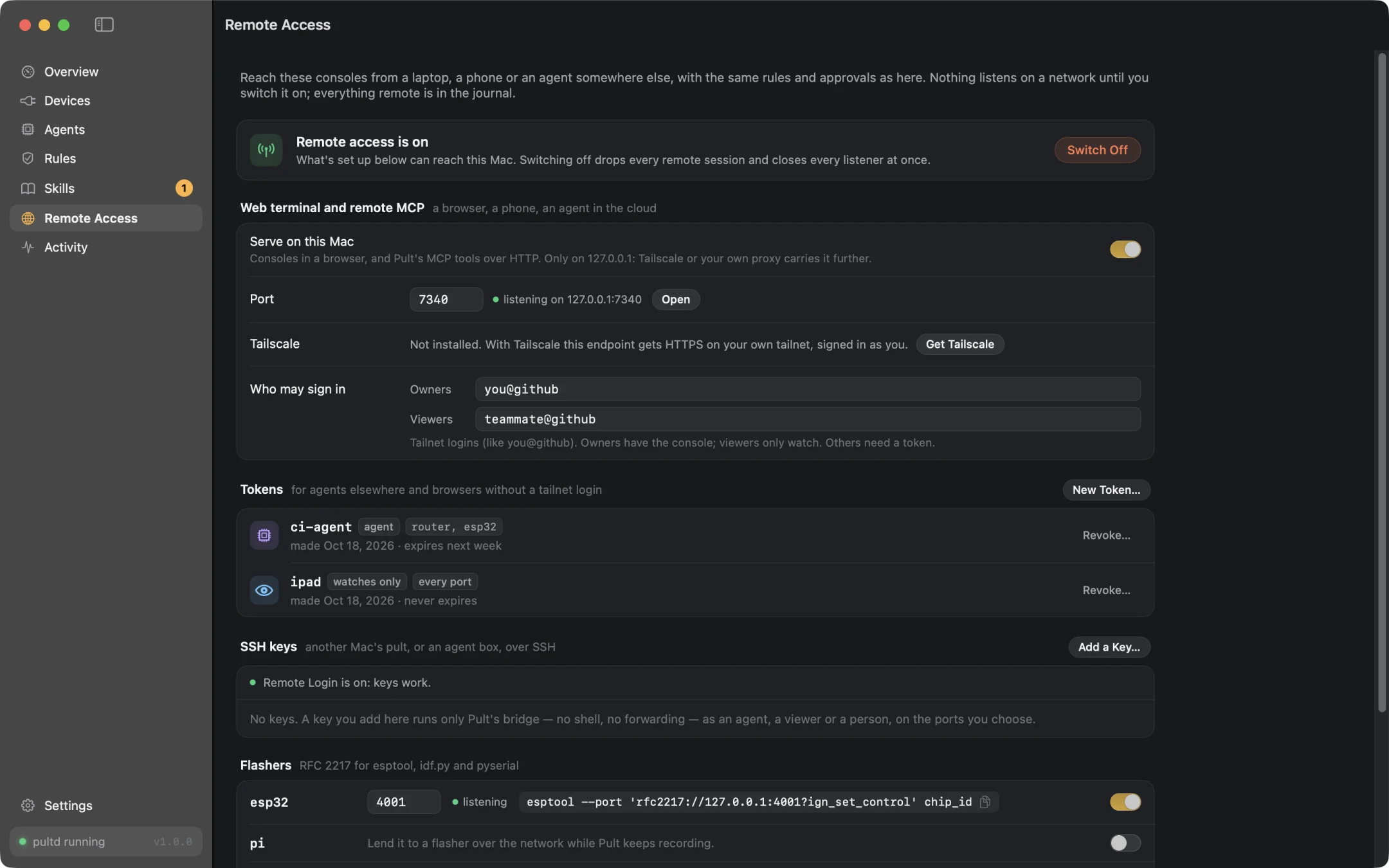
Pult's remote access: the kill switch, web terminal, tokens, SSH keys and flasher ports
Real agent, real app

Watch Claude fix a router.

“The 5 GHz Wi-Fi on our test router keeps dropping clients.” Claude reads the console, finds radar hits on a DFS channel, asks before it changes anything, checks the fix, and leaves a note for the next agent. A real Claude Code session and the real Pult app; the router is a simulated OpenWrt board, so you can see every step.

Under the hood

Built for people who live on serial consoles.

A small Rust daemon does the work; the app and the pult command are two ways to talk to it.

~ — zsh
$ pult exec router 'cat /proc/mtd'          # one command, exactly its output
[router · done · 83 ms]
dev:    size   erasesize  name
mtd0: 00100000 00020000 "BL2"
mtd1: 00080000 00020000 "u-boot-env"
mtd4: 04000000 00020000 "ubi"

$ PULT_AGENT=claude pult exec router 'mtd erase u-boot-env'
[router · denied · denied by pack linux-destructive rule 1]    # exit 3, instantly

$ pult wait pi 'login: $'                   # blocks until the board gets there, across reboots
$ pult attach router                         # your terminal, shared live — Ctrl-T for Pult's keys
$ pult agents
✓ Claude Code     connected as claude, with the pult-console skill
✓ Codex           connected as codex, with the pult-console skill
· Cursor          not connected — pult agents connect cursor

Every adapter

FTDI, CP210x, CH34x, PL2303, ESP32 USB-Serial-JTAG, RP2040, ST-LINK, CDC-ACM. Pult tells look-alike adapters apart by serial number or USB socket.

Consoles it understands

U-Boot, Linux shells and logins, BusyBox, OpenWrt, Zephyr, NuttX, MicroPython. U-Boot input is typed one character at a time, so nothing gets dropped.

Plain files

One TOML config that keeps your comments, recordings on disk, a journal you can read. Reset and bootloader sequences for ESP32, Arduino and RP2040.

Trust

Local first. No cloud in between.

No account, no telemetry

Pult runs entirely on your Mac. It never phones home; this site sets no cookies.

Everything is in the journal

Who wrote what, which rule decided, what you allowed and refused — searchable, per port.

A freeze switch

One click and no agent writes anywhere until you thaw. Take the console back from any agent at any moment.

Signed and notarized

Signed with an Apple Developer ID and checked by Apple. The agent socket offers no admin verbs at all.

Questions

Good to know.

Is Pult really free?

Yes. Pult 1.0 is free to download and use — no account, no trial, no limits.

Do I need an AI agent to use it?

No. Pult is a better screen on its own: ports that never get stuck, every console recorded and searchable, a console window per board, and the pult command for scripts. Agents are there when you want them.

Which agents work with Pult?

Anything that speaks MCP. Pult connects Claude Code, Codex, Claude Desktop, Cursor, VS Code, Windsurf, Gemini CLI, opencode and Zed in one click, and agents without MCP can use the pult command from their shell.

Can an agent brick my board?

Not through Pult. Commands that write flash or erase the bootloader environment are refused in every console context, whatever an agent's trust. Everything that isn't plainly read-only asks you first unless you decide otherwise.

What about passwords?

At a login prompt the agent asks for the secret; you type it in Pult and it goes straight to the device. The agent never sees it, and it isn't recorded.

Which Macs?

macOS 14 Sonoma or later, on Apple silicon and Intel. The app lives in the menu bar; its daemon starts at login.

Put your bench on Pult.

Free for macOS. Two minutes from download to an agent reading your boot log.

Version 1.0.0macOS 14+Universal